From Idea to Website in Minutes: A Step-by-Step Guide
You Don't Need to Be a Designer or Developer
A few years ago, creating a professional website meant one of two things: learn to code or pay someone who already knows how. Both options cost time, money, or both - and for many small business owners, neither felt accessible.
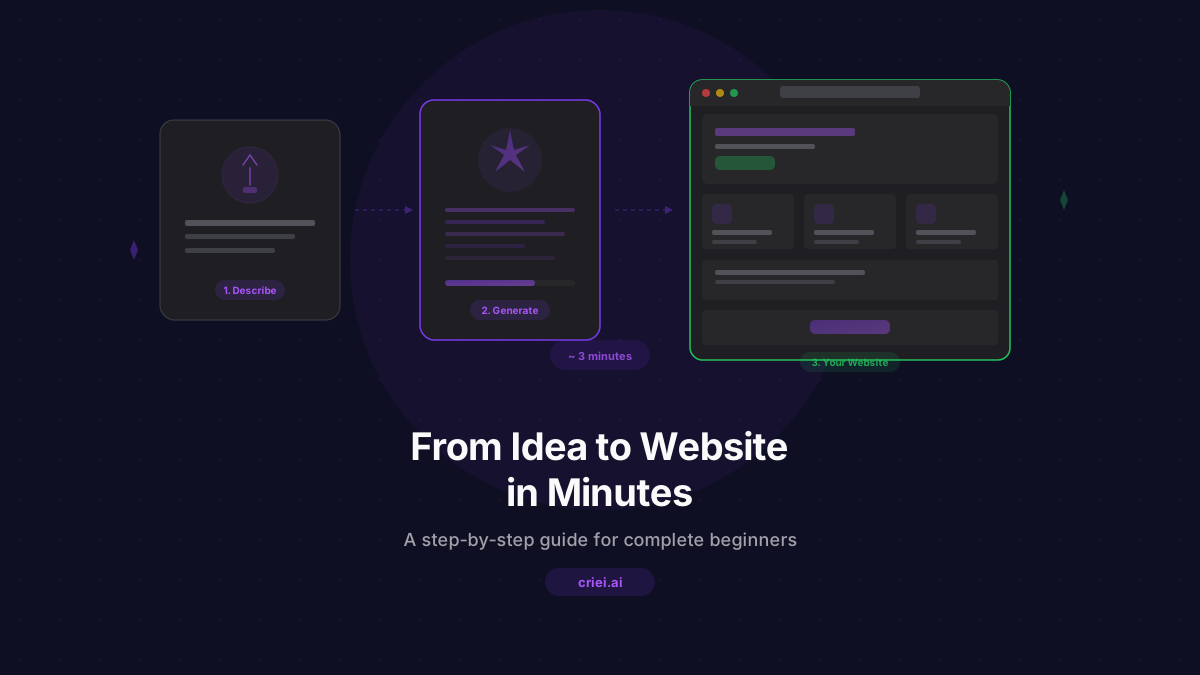
That's changed. With AI-powered design tools, you can go from a blank screen to a polished, professional website in minutes. No templates to wrestle with. No drag-and-drop editors that never quite do what you want. Just describe your business in plain language and let the AI handle the rest.
This guide walks you through the entire process using criei.ai, step by step.
Step 1: Sign Up and Get Started
Head to criei.ai and create an account. You can sign in with Google - it takes about ten seconds. The free tier gives you 3 credits to try things out, and the Pro plan at $19/month includes 50 credits for serious project work.
Once you're in, you'll land on your dashboard. This is your home base where all your projects live.
Step 2: Create a New Project and Choose Your Format
Click New Project and give it a name - something like "My Bakery Website" or "Fitness Studio Landing Page." Then pick the format that fits what you're building:
- Landing page: A single, scrollable marketing page - perfect for promoting your business, product, or service
- Web app: A multi-page application with navigation - ideal for dashboards, SaaS tools, or content platforms
- Mobile app: A native app design with phone frames - great for validating app ideas before development
- Social media: Posts and stories optimized for platforms like Instagram and Facebook
- Ad creative: Banner ads and promotional graphics in various sizes
- Presentation: Slide decks for pitches, meetings, and training
For most small businesses starting out, landing page is the right choice. It's the fastest way to get a professional web presence.
Step 3: Describe Your Business in a Prompt
This is where the magic happens. In the chat panel, describe what you want. The more detail you provide, the better the result. But don't overthink it - even a simple description produces surprisingly good results.
Here are some examples for different types of businesses:
For a bakery:
"A landing page for Sunrise Bakery, a family-owned bakery in Portland. Warm, cozy feel with earthy tones. Include a hero section with the bakery name and tagline 'Baked Fresh Every Morning', a menu section showing bread, pastries, and cakes with cards, a story section about our family tradition since 1998, customer reviews, and a contact section with address and hours."
For a fitness studio:
"A landing page for Peak Performance, a boutique fitness studio. Modern, energetic design with dark background and vibrant orange accents. Hero section with a bold headline, class schedule section, trainer profiles with photos, membership pricing with three tiers, transformation testimonials, and a sign-up form."
For a consulting firm:
"A professional landing page for Clarity Consulting, a management consulting firm. Clean, corporate design with navy blue and white. Hero with a tagline about driving business growth, services section with icons for strategy, operations, and digital transformation, case study highlights, client logos section, and a contact form."
For a restaurant:
"A landing page for Sabor Latino, a Latin American restaurant. Rich, vibrant colors - deep reds and warm yellows. Hero with an inviting food image area, a featured dishes section with cards showing photos and descriptions, the full menu organized by category, a reservation section, and the location with hours."
For a freelance photographer:
"A portfolio landing page for a wedding photographer. Elegant, minimal design with lots of whitespace. Full-width hero with a photo gallery area, an about section, packages and pricing with three tiers, a testimonial carousel area, and a booking inquiry form."
Hit Enter and watch.
Step 4: Watch AI Generate Your Design
Once you submit your prompt, the AI works in two phases. First, it creates a plan - deciding which sections to include and how to structure the page. Then it generates the actual design, screen by screen, streaming the results to your canvas in real time.
You'll see a complete, styled landing page appear in seconds. It's not a wireframe or a rough draft. It's a finished design with proper typography, colors, spacing, and responsive layout - all based on what you described.
Step 5: Refine with Chat
Here's where criei.ai really shines. Your first generation is a strong starting point, but you'll almost certainly want to adjust things. Instead of digging through menus and settings, you just... talk to it.
Click on any screen and type what you want to change:
- "Make the hero section taller and add more padding"
- "Change the color scheme to forest green and cream"
- "Add a pricing section with a free trial and two paid plans"
- "Make the testimonial section more prominent"
- "Change the font to something more playful"
Each edit regenerates just that screen, keeping everything else intact. It costs one credit per edit, so you can iterate freely.
Some tips for effective refinement:
- One change at a time: "Make it blue and add a new section and change the layout" is hard for anyone - human or AI - to execute perfectly. Break it up.
- Be specific with colors: "Blue" is vague. "Sky blue, like #87CEEB" is precise.
- Reference what you see: "Move the pricing section above the testimonials" tells the AI exactly what you want.
Step 6: Export Your Design
When you're happy with the result, it's time to export. Click the export button to download individual screens or the entire project as PNG images.
You can use these exports to:
- Share with a developer who can build the real site based on your design
- Present to stakeholders or business partners for feedback
- Use as visual assets in other marketing materials
- Post on social media to announce your upcoming launch
Every export comes with a commercial license, so you can use the designs however you need.
Real Example: From Prompt to Website in 3 Minutes
Let's walk through a concrete example. Say you run a small yoga studio called "Still Point Yoga" and you need a website.
Your prompt:
"A calm, serene landing page for Still Point Yoga, a neighborhood yoga studio. Soft sage green and cream color palette. Hero section with the studio name and 'Find Your Balance' tagline. Class schedule organized by day. Instructor profiles with short bios. Pricing section with drop-in rates and monthly memberships. Student testimonials. Location section with address and a 'First Class Free' call to action."
What happens next:
- The AI plans six sections for your page
- It generates the complete design with your color scheme, content, and layout
- You see the full page on your canvas in about 30 seconds
You refine:
"Add more spacing between sections and make the pricing cards have rounded corners"
"Change the CTA button color to a deeper sage green"
Done. Three minutes, three credits, one professional website design.
No Coding. No Design Skills. No Waiting.
The traditional path from idea to website involves weeks of planning, design rounds, revisions, and development. For small businesses that need to move fast, that timeline doesn't work.
With criei.ai, the entire process - from first prompt to finished design - takes minutes. You stay in control of the creative direction while the AI handles the execution.
Whether you're a baker, a consultant, a photographer, or any other small business owner, your next website is just a few sentences away.
Start creating for free or head straight to your dashboard to build your first project.